If you use Debian, Ubuntu, or any Linux distribution featuring the GNOME desktop environment, you probably love the Dash to Dock extension. It brings the convenience of a modern application dock right to your screen.
However, you have likely run into a frustrating limitation: GNOME does not let you drag and drop regular folders directly onto the dock.
Because the GNOME dash handles dock favorites strictly as application shortcuts (.desktop files), the trick to pinning a folder is creating a mini-launcher that commands your file manager (Nautilus) to open that exact path.
In this quick guide, we will look at how to pin a specific folder—like a dedicated Documents/kids folder—to your dock in under two minutes.
Step 1: Generate the Folder Launcher via Terminal
Instead of manually navigating hidden system directories, we can use a quick terminal command to generate a custom application shortcut.
Open your terminal and paste the following block of code:
Name= This is the display title that appears when you search your system.
Exec= This tells your system to launch Nautilus and automatically target your designated folder path (/home/sumnima/Documents/kids).
Icon= Assigns a clean system folder icon to the shortcut.
chmod +x Makes the file executable so GNOME recognizes it as an active system app launcher.
Step 2: Search and Pin It to the Dock
Now that your system recognizes the folder path as an application, pinning it takes just a few clicks:
Press the Super key (the Windows or Command key) to pull up the GNOME Activities Overview.
Type “Kids Documents” into the search bar.
Right-click on the folder icon that appears in your search results.
Click Add to Favorites (or Pin to Dash depending on your GNOME version).
Your custom folder will instantly appear on your Dash to Dock, giving you single-click access to your files from anywhere!
Pro-Tip: Give Your Folder a Custom Visual Style 🎨
If you pin multiple folders, having them all use the generic blue or grey system icon can get confusing. You can easily change the shortcut’s appearance to a distinct style.
Open the shortcut file with a terminal text editor:
It’s been a decade since I touched Linux, so here I come with Mint flavor! My fingers are in pain because they only know the Mac keyboard layout. I keep trying to copy, paste, and do everything using the Super button, so I need to change this layout ASAP.
Future Me, Read This If Your Fingers Hurt Again!
For Newer Linux Mint Versions (Mint 22.3+)
Open the Mint Menu and click System Settings.
Click on Keyboard (located in the Hardware section).
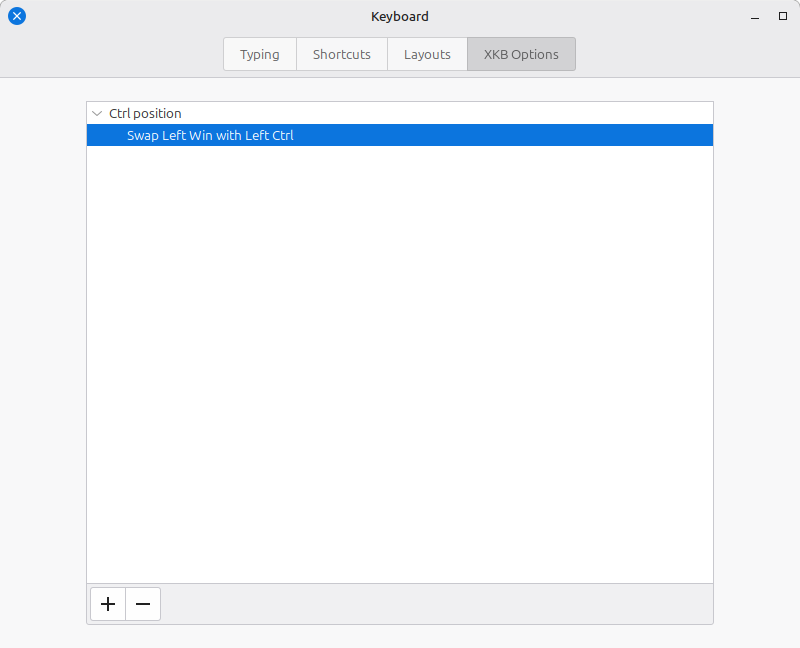
Click the XKB Options tab at the top.
Click the + (plus) button at the bottom of the window.
Expand the Ctrl position section, check Swap Left Win with Left Ctrl, and click Add.